
Unified Payments Interface (UPI) is a digital payment system that has revolutionized the way we pay and receive money in India. It is a fast, convenient, and secure way to transfer money between bank accounts using your smartphone.
However, like any other digital payment system, UPI is also vulnerable to fraud and cyberattacks. That’s why it is important to be aware of the security features available and take steps to protect your account from unauthorized transactions.
One of the most important security features offered by HDFC Bank is the ability to block UPI debit transactions. This means that you can prevent anyone from sending money out of your account using UPI, even if they have your UPI PIN.
Why block UPI debit transactions?
There are a few reasons why you might want to block UPI debit transactions for your HDFC Bank account:
- If you have lost your phone or believe it has been stolen.
- If you have received a phishing email or SMS message and entered your UPI PIN.
- If you have noticed any unauthorized activity on your account.
- If you are travelling abroad and do not want to be able to send money out of your account using UPI.
When you Block UPI Debit Card for your HDFC Account, nobody can send money from your bank account via any UPI application.
Block UPI Debit for your HDFC Account Online Step by Step
To block UPI debit transactions for your HDFC Bank account, you can follow these steps:
(Step 1) Log in to the HDFC Mobile Banking app.
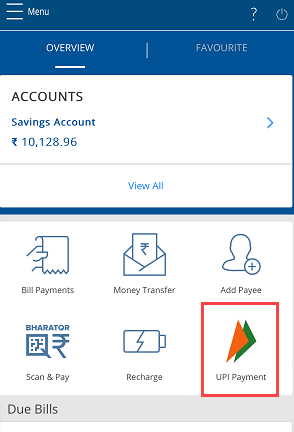
(Step 2) Tap on “UPI Payment” on the home screen.
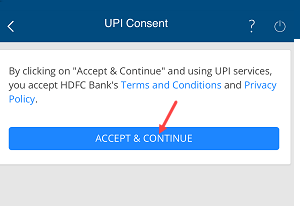
(Step 3) Now tap on Accept and continue.
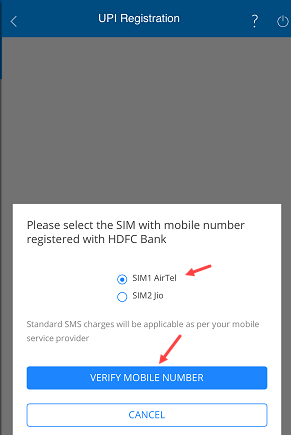
(Step 4) Select your registered mobile number SIM and tap on verify your mobile number.
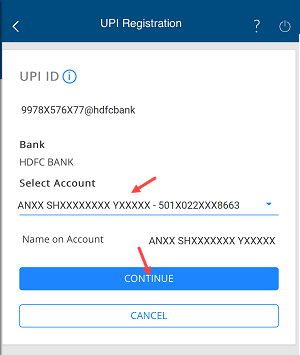
(Step 5) Next screen select your HDFC bank account number and continue.
(Step 6) Your UPI account is created successfully.

(Step 7) Now open the UPI Payment section, here you can view the “Manage” option, select this option and proceed.
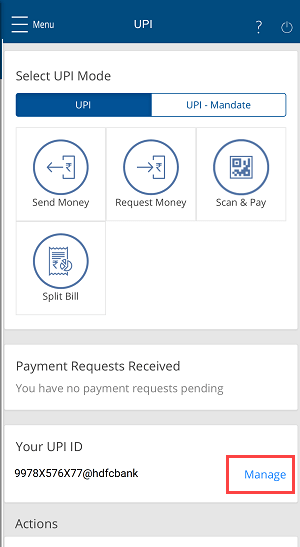
(Step 8) Next screen tap on the “Block UPI Debit” option as you can see in the below image.

(Step 9) And finally tap on the confirm and block UPI Debit for your account.

Once you have blocked UPI debit transactions, you will no longer be able to send money from your HDFC Bank account using any UPI app. However, you will still be able to receive money from others.
How to unblock UPI debit transactions
To unblock UPI debit transactions, you will need to visit your HDFC Bank branch. You can not unblock UPI Debit for your account online.