
If you are a Bank of India (BOI) customer, there is a simple and convenient way to access your account information using BOI WhatsApp Banking. Whether you want to check your account balance, view recent transactions, or access other banking services, WhatsApp Banking makes it easier than ever—without visiting a branch or downloading a separate app.
In this article, we will walk you through how to check your BOI account mini statement on WhatsApp, step by step.
Why Use WhatsApp Banking with Bank of India?
BOI WhatsApp Banking is a secure and fast service that allows customers to manage their account details through WhatsApp. It offers a seamless experience and eliminates the need to visit an ATM, branch, or use the net banking portal for basic services like checking your mini statement or balance.
No registartion required for BOI WhatsApp Banking and you can start by just saving the official WhatsApp banking number. It is free service from the bank.
Step-by-Step Guide: How to Check BOI Mini Statement on WhatsApp
Before you start, make sure the following requirements are met:
-
Your mobile number is registered with the Bank of India
-
You have WhatsApp installed on your mobile device
-
You have saved the official BOI WhatsApp number in your contact list
- Bank account and WhatsApp account should have the same mobile number
Step 1: Save the Official BOI WhatsApp Number
-
Open your phone’s contact list
-
Save the following number as “BOI WhatsApp Banking”: +91 7997987601
-
Double-check that the number is saved correctly so that WhatsApp can recognize it
Step 2: Start a Chat with BOI on WhatsApp
-
Open WhatsApp on your phone
-
Start a new chat and select the saved BOI contact
-
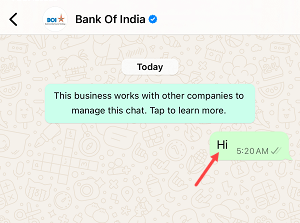
Type and send the message “Hi”
-
You will receive an automated welcome message from Bank of India
Step 3: Opt-In for WhatsApp Banking Services
-
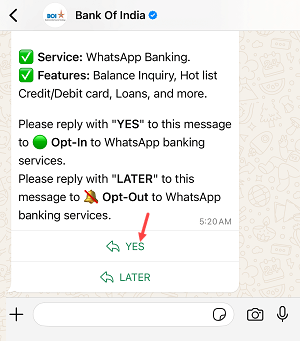
You will be prompted with a message asking you to opt-in
-
Reply with “YES” to confirm your consent
-
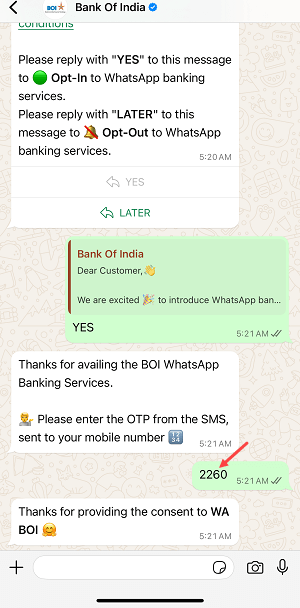
An OTP (One-Time Password) will be sent to your registered mobile number via SMS
-
Enter the OTP in the chat to verify your identity and complete the opt-in process
Step 4: Explore WhatsApp Banking Services
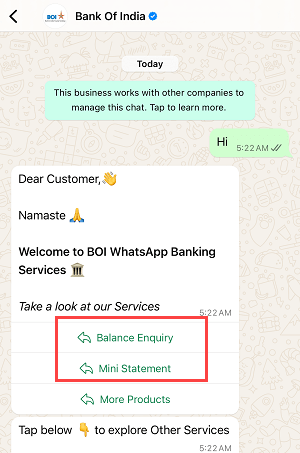
Once opt-in is complete, a menu will be displayed with available services. Common options include:
-
Balance Enquiry
-
Mini Statemen
You can either type your choice (for example, “Mini Statement”) or tap on the provided option.
Step 5: Check Your BOI Mini Statement
-
Select “Mini Statement” in the chat
-
The bank will process your request and fetch the latest account activity
-

Step 6: Choose to View More or Exit
-
To view more transactions, reply with “Yes”
-
To return to the main menu, reply with “Main Menu”
-
To end the session, type “Exit Chat”
Frequently Asked Questions
1. Is BOI WhatsApp Banking free to use?
Yes, the service is free of charge. Standard messaging or data rates may apply depending on your mobile carrier.
2. Can I check my BOI account balance as well?
Yes. After opting in, just type “Balance Enquiry” to receive your current BOI account balance.
3. What if I don’t receive the OTP?
Make sure your number is registered with BOI and your phone has network coverage. You can try resending or contact customer support if the issue continues.
4. Can I access this service on a non-smartphone?
No. Since the service works via WhatsApp, a smartphone with WhatsApp installed is required.
Conclusion
Bank of India WhatsApp Banking provides an easy and efficient way to check your account details, especially your BOI mini statement. By simply saving the number +91 7997987601, opting in, and following the prompts, you can access your recent transactions and BOI account balance in seconds.
Whether you’re traveling, at home, or just in a hurry, this service ensures that your banking needs are always just a message away. Start using BOI WhatsApp Banking today and take full control of your finances with convenience and security.