
You’re looking to simplify your Indane gas cylinder bookings? The IndianOil ONE app is your solution! This comprehensive guide will walk you through every step, from installation to successful booking, ensuring a hassle-free experience.
This article provides a detailed, step-by-step process for booking your Indane LPG cylinder online through the official IndianOil ONE mobile application. You can order your Gas cylinder in just one click and choose payment options like online or Cash on Delivery.
Indane Gas Cylinder Booking via IndianOil ONE App
Booking your Indane LPG cylinder has never been easier. The IndianOil ONE app streamlines the entire process, allowing you to reorder your gas with just a few taps on your smartphone. This digital convenience saves you valuable time and offers a more controlled way to manage your gas cylinder requirements.
Beyond just booking, the IndianOil ONE app offers to change your distributer during order. You can get delivery from another distributor. From tracking past orders to managing your consumer details, the app provides a centralized platform for all your Indane needs. Let’s dive into the step-by-step guide to get you started.
Here’s how to book your Indane gas cylinder using the IndianOil ONE app:
Download and Install the IndianOil ONE App:
Go to your device’s app store (Google Play Store for Android or Apple App Store for iOS). Search for “IndianOil ONE” and install the official app published by IndianOil Corporation Ltd.
Register on the IndianOil ONE App
Once installed, tap on the IndianOil ONE icon to launch the application. Tap on the menu icon (usually three horizontal lines or a profile icon). Select “Login / Signup.”
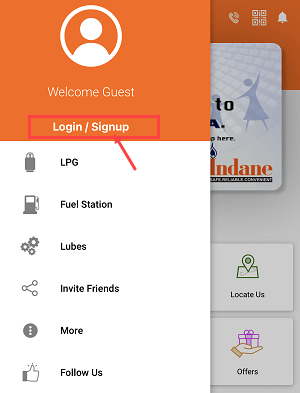
Select the “Register” option
On the app’s login screen, locate and tap on the “Don’t have an account? REGISTER” option.
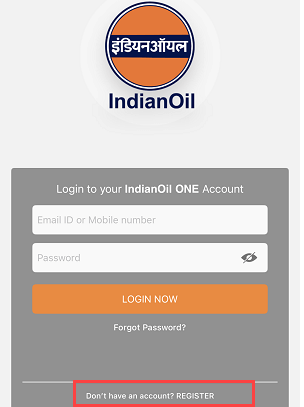
Enter your Mobile Number, Name, and Email
You will be prompted to fill in your personal details, including your mobile number, first name, last name, and email ID. Make sure all information is accurate.
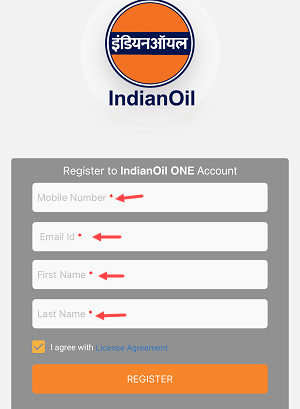
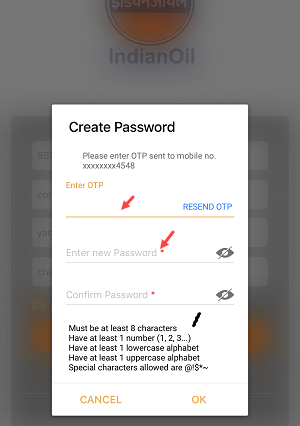
Enter OTP and Create a Login Password
After submitting your details, a One-Time Password (OTP) will be sent to your registered mobile number. Enter this OTP in the app. Following this, you will be asked to create a strong, unique login password for your account. Ensure it meets the specified security criteria (e.g., minimum length, inclusion of numbers, special characters, uppercase, and lowercase letters).
Log in To your Account
Once registration is complete and your password is set, use your registered mobile number or email ID along with your newly created password to log in to your IndianOil ONE account.
Select Link My LPG ID
Upon successful login, if your LPG ID isn’t already linked, you will see a prominent option to “LINK MY LPG ID.” Tap on this to proceed.
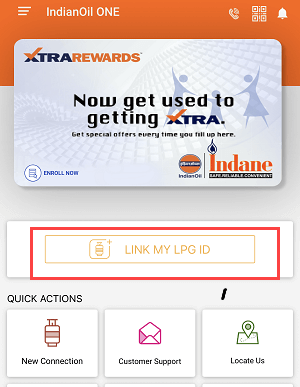
Enter 16-Digit LPG ID
You will be prompted to enter your unique 16-digit LPG ID. Carefully input each digit into the provided fields.

Confirm your Details
After entering your LPG ID, the app will display your consumer details associated with that ID. Review these details carefully to ensure they match your records. If everything is correct, confirm the details as prompted by the app.
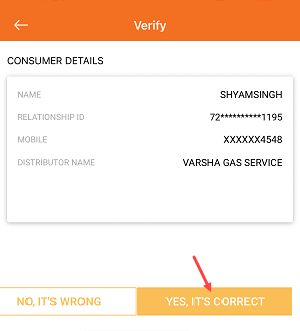
LPG ID Successfully Linked
Once confirmed, your LPG ID will be successfully linked to your IndianOil ONE account. A confirmation message will typically appear, and now you can book your gas cylinder in just one click.

Now Book your LPG Cylinder
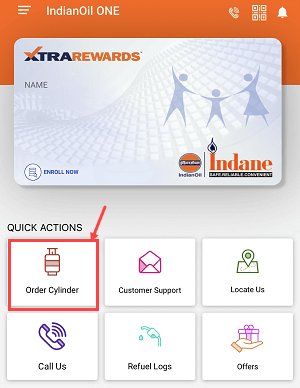
- With your LPG ID successfully linked, you can now proceed to book your cylinder. On the app’s main dashboard, look for the “Order Cylinder” option, usually found under “Quick Actions.”
- Select the type of cylinder (e.g., 14.2 Kg domestic refill) and your preferred delivery option (normal delivery or preferred delivery, if available).
- Review the order details, including the price, and then confirm your booking by tapping “ORDER NOW.”

Congratulations! Your gas cylinder has been successfully booked. You can choose to pay online or simply pay cash upon delivery at your address.
How to Find Your Indane LPG ID if You Don’t Know It
If you are unsure of your 16-digit Indane LPG ID, you can easily find it online:
- Search Online:
- Open your web browser and search for “Indane LPG ID.”
- Look for the official Indane website link (e.g., mylpg.in or a similar IndianOil portal).
- Find Your LPG ID on the Website:
- On the Indane website, navigate to the section for finding your LPG ID. This might be under “Find your LPG ID” or “Know Your LPG ID.”
- You will typically be prompted to enter your distributor name and consumer number. This information is usually available on your gas passbook.
- After entering the details and completing any captcha verification, click “Proceed.”
- Your 16-digit LPG ID will be displayed on the confirmation page.
Final Words
Booking your Indane gas cylinder through the IndianOil ONE app is a modern, efficient, and user-friendly way to manage your LPG needs. By following these simple steps, you can ensure a continuous supply of gas, right at your fingertips. Embrace the digital convenience and enjoy the ease of managing your Indane services from anywhere, anytime.