
If you have decided to close your Zerodha Demat account then you don’t need to submit an offline account closure physical form. Now you can permanently close your Zerodha Demat account online by following just a few steps. Here we will tell you the step-by-step Zerodha account online account closure process.
All you need is your Aadhaar card number and Aadhaar registered mobile number to close your Zerodha account online. If you have both then follow these steps:
Before you proceed account closure request, please note:
- Account closure will not be processed if you have a negative balance in your account. Ensure that all dues are cleared.
- If you have holdings or positions, you have to transfer them to another Demat account or exit them.
Close Online Zerodha Demat Account
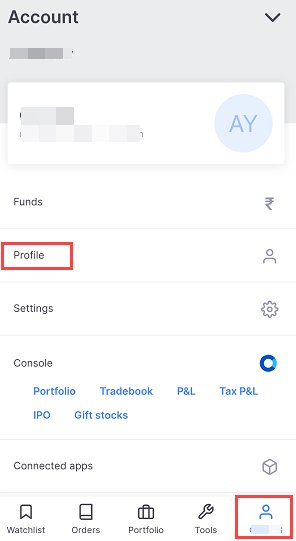
Step 1: Login to Zerodha Mobile Application (Kite) & click on User Icon and then select and open the “Profile” option as you can see in the below screenshot. (If you are on a PC or browser then you can visit this link directly and login: console.zerodha.com/account/segment-activation)
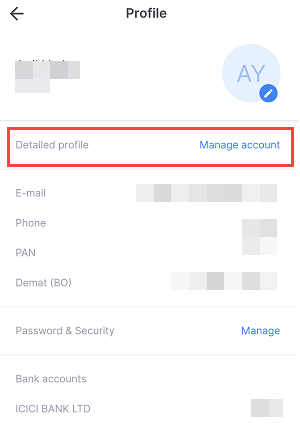
Step 2: In the profile, tap on “Manage Account” option.
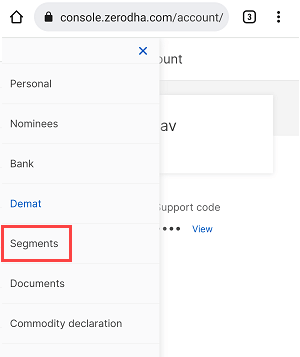
Step 3: Now in the Manage Account, open menu options and tap on “Segments”
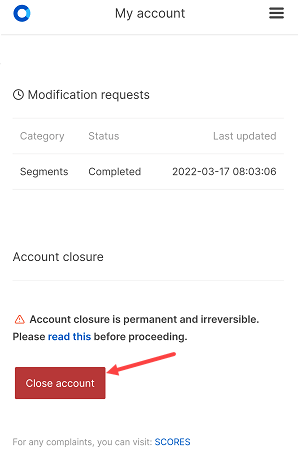
Step 4: In Segments, slide down below and here you can see the “Close Account” button, tap on it.
Step 5: Now select the reason for account closure and tap on continue.
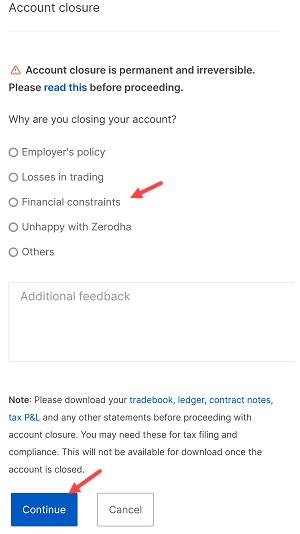
Step 6: Now you need to select the e-Sign option and click on Sign now. Once you accept the T&C, enter your Aadhaar number and click Send OTP. Enter the OTP received on your Aadhaar linked mobile number and click Verify OTP. Your account will then be closed within 72 working hours.
You will receive an email from the Zerodha about account closure request. So this is how to close Zerodha Demat account online without submitting an offline form.