
Ever needed to complete an online payment but didn’t have your ICICI Bank credit card handy? The good news is you don’t always need your physical card. ICICI Bank allows you to securely view your credit card number, CVV, and expiry date online, either through the iMobile Pay app or Net Banking portal.
This guide walks you through the simple steps to access your card details digitally, so you’ll never be stuck during an urgent transaction.
Viewing ICICI Credit Card Details via iMobile Pay App
The iMobile Pay app is the fastest and most convenient option to retrieve your card details on your smartphone.
Step 1: Sign in to the App
Launch the iMobile Pay app and log in using your fingerprint, Face ID, or your 4-digit PIN.
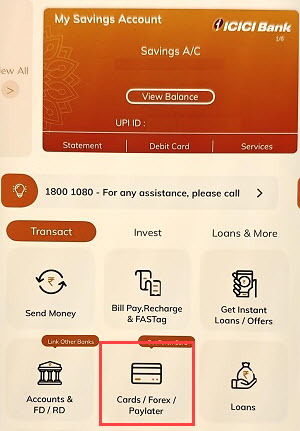
Step 2: Open the “Cards & Forex” Section
From the home screen, tap on Cards & Forex to manage your linked credit and debit cards.
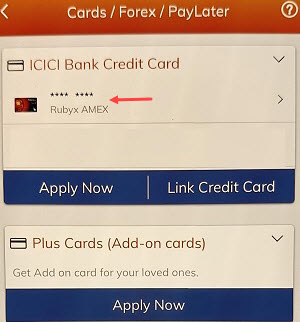
Step 3: Choose Your Credit Card
Select the ICICI credit card you want to check from the list of available cards.
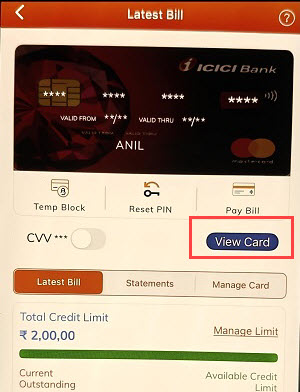
Step 4: View Virtual Card Information
Tap on View Card (or similar option). This will open the virtual version of your card.
Step 5: Verify Your Identity
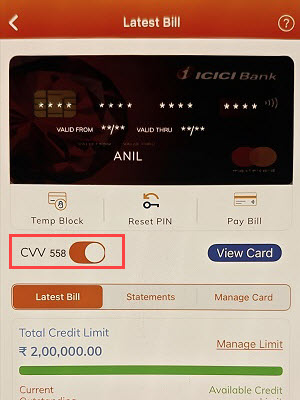
For security, you’ll be asked to confirm using your MPIN or an OTP sent to your registered mobile number. Once verified, your 16-digit card number and expiry date will be displayed.

To reveal the CVV, simply toggle the Show CVV option.
Accessing ICICI Credit Card Details Through Net Banking
If you’re using a laptop or desktop, Net Banking offers a secure way to access your card details.
Step 1: Log in to Net Banking
Go to the official ICICI Bank website and sign in with your User ID and password.
Step 2: Navigate to “Credit Cards”
Click on Cards → Credit Cards in the menu bar.

Step 3: Select Your Card
Choose your credit card, then click the eye icon to reveal hidden details.
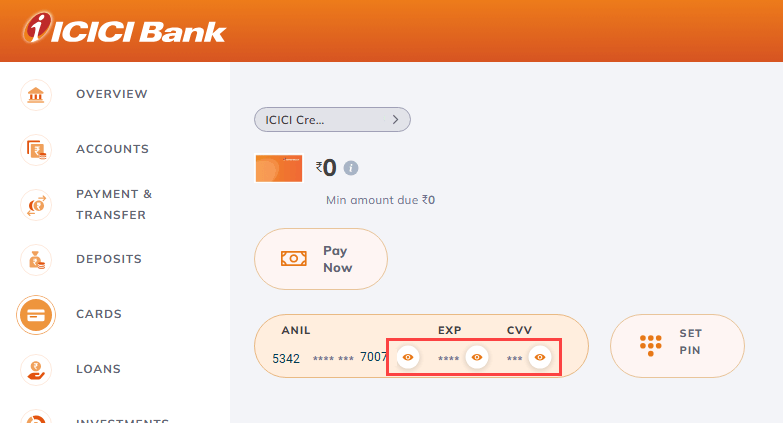
Step 4: Complete Verification
You’ll be prompted to select a verification method—Call, SMS, or Email—to receive an OTP.
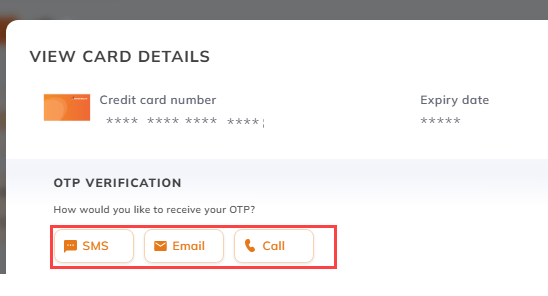
Step 5: Authenticate Securely
Enter your transaction password or the OTP sent to your registered mobile.
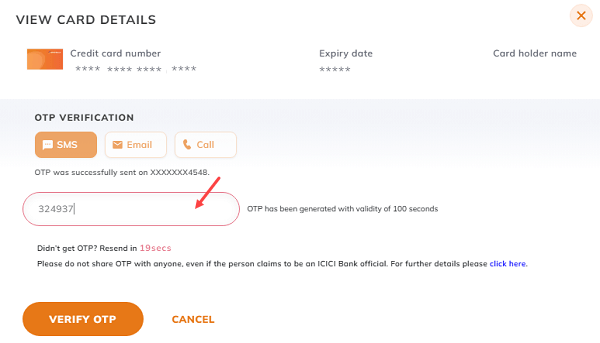
Step 6: View Card Number, CVV & Expiry
Your complete card details, including number, CVV, and expiry date, will now be visible on the screen.
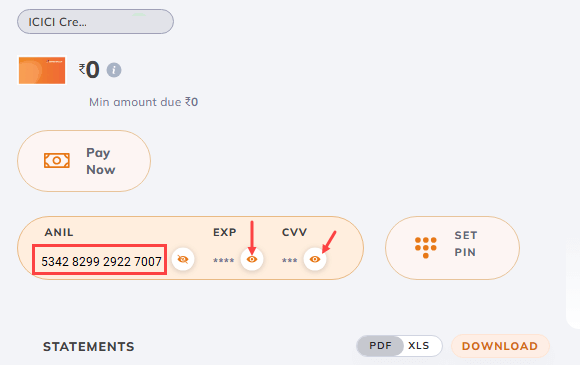
Frequently Asked Questions
1. Is it safe to view card details online?
Yes. ICICI Bank uses strong security protocols like OTP verification and multi-factor authentication to ensure only you can access your information.
2. What details are shown online?
You can view your 16-digit card number, expiry date, and CVV—all the details needed for online transactions.
3. Can I see my card details without Net Banking or iMobile Pay?
No, you must be registered with either iMobile Pay or Net Banking to access your virtual card. Registration is simple and can be done using your credit card.
4. What if my physical credit card is lost?
Immediately block your card through iMobile Pay or Net Banking to prevent misuse. You can then request a replacement card directly from the platform.
Final Thoughts
With ICICI Bank’s digital platforms, managing your credit card has never been easier. Whether you’re using the iMobile Pay app or Net Banking, you can securely access your card number, CVV, and expiry date anytime, ensuring smooth and hassle-free online payments—even without your physical card.