
In an age where digital transactions are paramount, the security of your debit card is more important than ever. Misplacing your wallet or suspecting fraudulent activity on your card can be a stressful experience. Traditionally, the only solution was to call customer care and permanently block the card, a process that is often irreversible and requires waiting for a new card to be issued. This can be inconvenient, especially if you find your card just moments after blocking it.
Fortunately, Central Bank of India (CBI) offers its customers a modern, convenient solution through its Cent eeZ net banking platform. This service provides a feature to temporarily lock and unlock your ATM debit card at your convenience. This gives you complete control over your card’s security, offering peace of mind without the hassle of permanent blocking. Whether you’ve misplaced your card or simply want to disable it for a period for security reasons, you can do so instantly from your computer.
How to Lock and Unlock Your Central Bank of India ATM Debit Card Online
The process of managing your debit card’s active status is straightforward through the Cent eeZ portal. If you are already registered for net banking, you can directly proceed with the login steps. However, if this is your first time using the service, you will need to complete a one-time registration process, which can be easily done using the Cent eeZ mobile app. This guide covers the entire process from start to finish.
Step 1: Visit the Official Central Bank of India Website

Open your web browser and navigate to the official Central Bank of India website. On the homepage, locate and click on the Internet Banking option. On the next page, under the “Personal Banking” section, select the “Cent eeZ” option and click on the “Proceed” button.
Step 2: Log in to Your Net Banking Account

You will be directed to the “Welcome to Online Banking!” page.
- Enter the User ID or CIF that you created during registration. Enter the captcha code shown on the screen and click “Login”.
- On the next screen, enter your Login Password. Verify your secure image and message before proceeding.
- Enter the One-Time Password (OTP) sent to your registered mobile number to complete the login process.
Step 3: Access the ‘Manage Debit Card’ Option

Once you are logged into your dashboard, you will see an overview of your accounts. Under your savings account details, locate and click on the “Manage Debit Card” icon. This will take you to the card management section.
Step 4: Temporarily Lock Your Debit Card
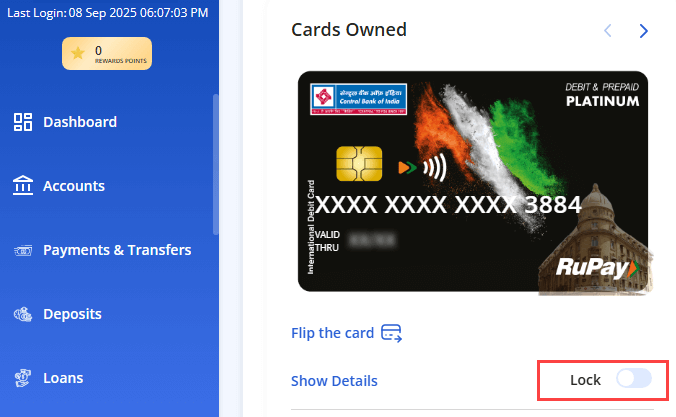
In the card management section, you will see an image of your debit card. Next to the card details, you will find a toggle switch labeled “Lock”. To temporarily block your card, simply click on this toggle switch to turn it ON. A success message will appear confirming that your “Card locked successfully.” Your card is now inactive and cannot be used for any transactions.
Step 5: Unlock Your Debit Card When Needed
When you find your card or wish to use it again, the unlocking process is just as simple. Log back into your net banking account and navigate to the “Manage Debit Card” section. You will see that the card status is “Deactive.” To unlock it, simply click the “Unlock” toggle switch to turn it OFF. A success message will confirm that the card has been unlocked, and it will be immediately ready for use.
Final Words
The ability to instantly lock and unlock your debit card is a powerful security feature offered by the Central Bank of India. The Cent eeZ platform makes this process incredibly simple, giving customers direct control over their account’s safety. By following the steps outlined above, you can easily protect your funds from potential misuse if your card is ever lost or stolen, and conveniently reactivate it without needing to contact the bank or wait for a replacement.
Frequently Asked Questions (FAQ)
Q1: What is the difference between locking a card and blocking a card?
A: Locking a card, as shown in this guide, is a temporary measure. You can unlock it yourself instantly online. Blocking a card is typically a permanent action taken by the bank, usually when a card is reported lost or stolen. A permanently blocked card cannot be reactivated, and a new card must be issued.
Q2: Are there any charges for using the card lock/unlock facility?
A: The Central Bank of India generally does not charge for using this online security feature. It is a value-added service provided to enhance customer security.
Q3: How long does it take to lock or unlock the debit card?
A: The action is instantaneous. As soon as you toggle the switch and receive the success confirmation, the status of your card is changed immediately.
Q4: What do I need to register for Cent eeZ net banking for the first time?
A: To register, you will need your bank-issued CIF number, your mobile number registered with the bank, and your active ATM/Debit card details (card number and expiry date).
Q5: Can I still receive payments or credits to my account if my debit card is locked?
A: Yes. Locking your debit card only prevents transactions made using the card (e.g., ATM withdrawals, online payments, POS transactions). It does not affect your bank account itself, so you can continue to receive funds via NEFT, RTGS, IMPS, or UPI.