
Do you wish to remove your bank account on Paytm? If yes then today we will guide you step by step on this topic. Paytm Mobile application offers UPI services so you can link your bank account and send/receive money through UPI. You can also pay online from your bank account with Paytm UPI.
If you ever find yourself in a situation where you need to remove or unlink your bank account from Paytm and close your UPI account then you can do it by following a few steps. There could be several reasons why you want to remove your bank account from Paytm, such as privacy and security concerns or switching to a different UPI app. Read this also: How To Add New UPI ID on Paytm
Follow our step-by-step guide in this tutorial to remove your Bank account from Paytm and close your Paytm UPI account.
Remove your Bank Account from the Paytm App
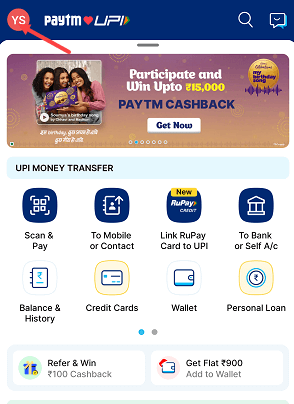
(Step 1) Open the Paytm profile section by clicking on the profile photo on the top left side as you can see in the below screenshot.
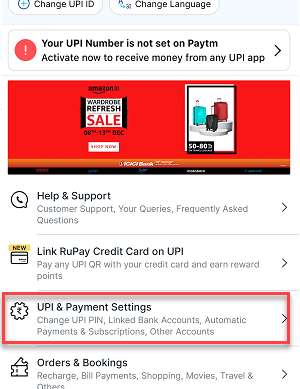
(Step 2) Now open the “UPI & Payment Settings” option. Here you can change your UPI PIN, view linked bank accounts and UPI ID, and access other UPI settings.
(Step 3) Next screen scroll down a little and you can view your linked bank accounts. Select and click on the Bank account to remove it from Paytm.

(Step 4) Next screen you can view your linked bank account number, IFSC code and other options like changing UPI PIN, check balance etc. Here you need to tap on the (⋮) symbol to open the options. Please check the below screenshot for more info.
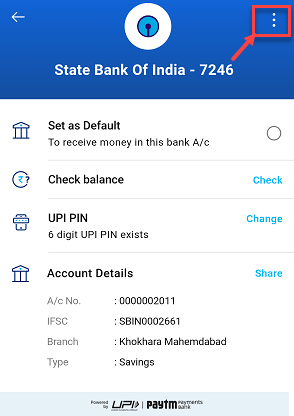
(step 5) Now you will get the “Remove Account” option, tap and proceed.

(Step 6) Tap on the Yes button to confirm your delete request.

Your Bank account has been removed successfully from the Paytm app. You can see the success message on the next screen. You can now check the linked bank account. The bank account that you have removed is no longer available.

Please note: As you have removed your bank account from Paytm, you won’t be able to send or receive money from this bank account anymore and won’t be able to make payments. If you have more than one bank account linked, you can use any other linked bank account. Read this: How to Add a Central Bank of India account on Paytm with Debit Card
How To Restore Bank Account Once Removed?
If you have removed and unlinked your bank account from Paytm by mistake then you can restore your account and link it again. You don’t need to create your UPI PIN again as you have already created it.
You can link your bank account again, just go to “UPI & Payments Settings” and here you can select the “Add Bank Account” option.
Choose your Bank from the bank list and after verifying your Bank registered mobile number, your bank account will be linked again.
How To Deactivate Paytm UPI Account?
If you have switched to another UPI application, such as PhonePe or Google Pay, and no longer wish to use Paytm’s UPI application, you can deactivate your Paytm UPI account along with all your linked bank accounts. Once you deactivate your Paytm UPI account, you will not be able to use UPI services on Paytm.
(Step 1) To deactivate your UPI account, open the Profile section and click on “UPI & Payments Settings”
(Step 2) In UPI & Payment Settings, you can see the (⋮) symbol, click on this.
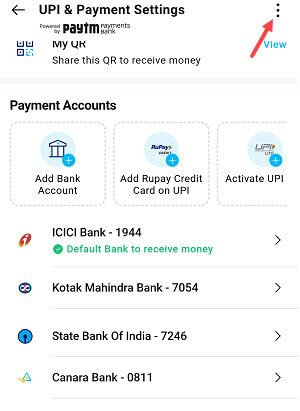
(Step 3) Now select the “Disable UPI Account” option.
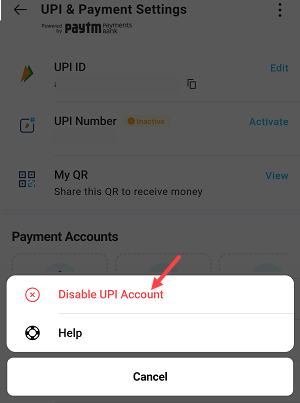
Done! Your UPI account on Paytm and all your linked bank accounts will be deactivated. You can’t use UPI services on Paytm now.
To reactivate your UPI account on Paytm and restore all your linked bank accounts with UPI ID and UPI PIN, you can click on the “Reactivate UPI Account” option anytime.
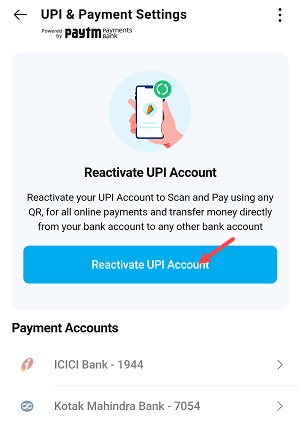
If you ever need to remove or unlink your bank account from Paytm, you can do so easily and at any time. And if you want to relink it later, you can verify your mobile number and link it again. Additionally, if you ever need to deactivate your UPI account, you can do that too, and then reactivate it again when you’re ready.